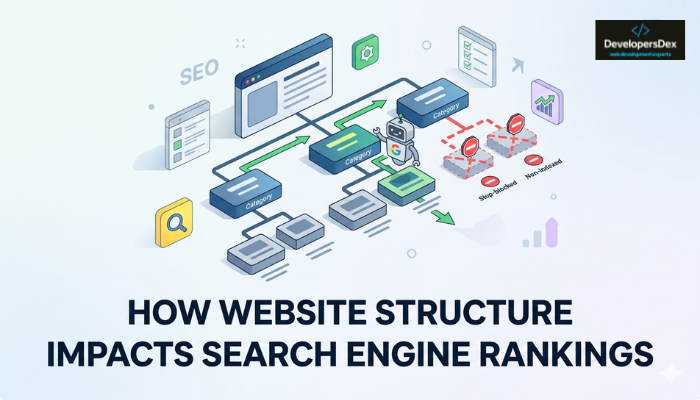
Website structure affects your rankings by controlling how Google discovers and moves through your pages. It’s not about design or content alone. If Google can’t follow a clear path through your site, your pages don’t get indexed, and pages that aren’t indexed don’t rank.
We see this regularly over at DevelopersDex. That’s why we put this guide together, so you’ll know exactly what a good structure looks like. You’ll learn how website structure SEO works, how it influences rankings, and what you can do to improve it.
Let’s start with the basics.
What Is Website Structure in SEO?
Website structure is the way your pages are organised, connected, and presented to users and search engines. It includes your URL hierarchy, internal links, navigation menus, and overall information architecture.
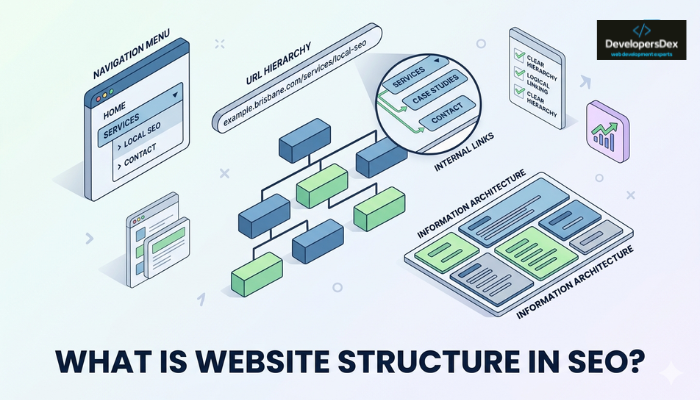
For example, imagine two Brisbane businesses publishing the same article about local SEO services. One has clear navigation and related pages that are easy to find, while the other’s content is scattered and poorly linked. Even with similar content, the first site has a better chance of ranking because Google can understand and crawl it more easily.
That’s what a good structure does. It makes it easy for Google to read, follow, and index your pages.
How Google Reads Your Site’s Structure
Google reads your site’s structure through search engine crawlers and internal links. We break both down below.
Search Engine Crawlers
Search engine crawlers are automated bots that move through your site by following links. They start at your homepage and work their way through your site’s pages, indexing what they find along the way.
That said, they don’t crawl every page. Google sets a limit on how many pages it will crawl in a given period, and that limit is called a crawl budget. If your site has hundreds of low-value or poorly linked pages, crawlers may burn through that budget before reaching your important pages. That’s why your most important pages should sit as few clicks from the homepage as possible.
Internal Links and Authority Flow
You might add a couple of links inside a blog post without thinking much of it. But Google uses those exact links to map your site’s structure, decide which pages are important, and determine how authority flows between them.
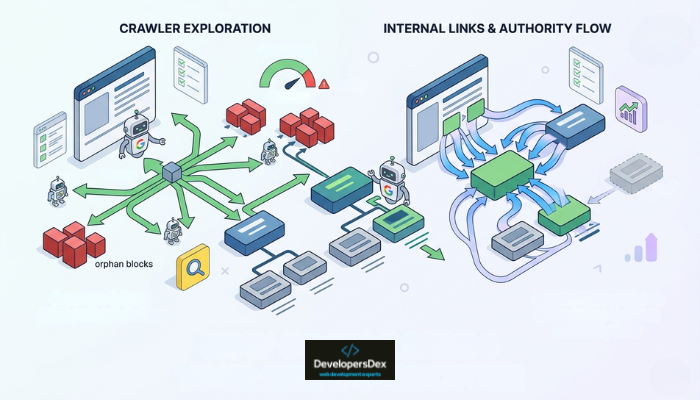
The pages with the most internal links pointing to them are seen as the most important. That’s why orphan pages are a problem. These are pages with no internal links pointing to them, so crawlers have no clear path to find them. As a result, they’re practically invisible to Google.
Structural Mistakes That Hold Back Rankings
When rankings drop, most people go straight to their content. They tweak headlines, update copy, and maybe add a few keywords. But in many cases, the issue starts with the structure. And most sites come back to these problems:
- Pages Buried Too Deep: If a page takes more than three clicks to reach from your homepage, crawlers may deprioritise it. So will users. Important content should live close to the surface.
- Broken Links: A broken link points to a page that no longer exists. It stops crawlers in their tracks and sends users to a dead end. Even a small number of broken links can disrupt the flow of authority across your site.
- Inconsistent URL Structure: Your URLs should reflect where pages belong in your site hierarchy. For example, a URL like “/services/web-design/brisbane” tells Google exactly where that page sits. But random or inconsistent URLs across different pages make it harder for search engines to understand your site’s structure.
- Poorly Linked Category Pages: Category pages sit between your homepage and your individual content pages. They should connect different pages together and pass authority downward. If they’re left isolated or thinly linked, other pages beneath them lose visibility too.
A site audit will surface most of these issues quickly. But before you start fixing anything, it helps to understand what a well-structured site actually looks like.
What a Well-Structured Site Looks Like
A good website structure follows a clear hierarchy. Your homepage sits at the top, linking out to your main category pages, which then connect to subcategories and individual pages below.
It looks something like this:
Homepage → Category Page (Pillar) → Supporting Articles → Links back to Pillar
This model, often called a topic cluster, works because it mirrors how Google evaluates authority. Pages with more internal links are generally seen as more important. So the pillar page at the centre of the cluster becomes your strongest ranking asset for that topic. As you add supporting articles, the cluster grows stronger and reinforces the authority of the main page.
But to make this work, your important pages need to be reachable within three clicks from the homepage. That’s because crawlers begin at the homepage and follow links outward. The deeper a page sits, the less crawl priority it receives.
A solid website structure also includes clean URLs, breadcrumb navigation, an HTML sitemap, and structured data. Each of these helps search engine crawlers find your pages and understand what they’re about.
A site built this way gives Google a clear map and gives users a smooth path to what they need. From there, the question is whether your current site holds up to that standard.
Auditing Your Website Structure: A Simple SEO Checklist
Your site can look perfectly functional to a visitor while Google is struggling to crawl half of it. Fortunately, a technical SEO audit tells you exactly what to look for. Here’s where to start:
- Crawl Your Site First: Use a tool like Screaming Frog or Sitebulb to map every page and link on your site. This gives you a full picture of your site’s structure, including pages that are buried too deep, broken links, and any orphan pages still floating around.
- Test Your Site Speed and Mobile Optimisation: Google’s PageSpeed Insights scores your site’s load time across desktop and mobile. A slow website drags down both user experience and search visibility, so anything below 50 on the performance score is worth investigating.
- Check Google Search Console: Not every page you publish gets indexed. Google Search Console shows you exactly which ones Google has picked up and which ones it’s skipping. If important pages are missing from coverage reports, that’s a sign your site’s health needs attention.
- Review Your Internal Linking: Look at which pages have the most internal links pointing to them and which have none. Your most important pages should have the most links pointing to them. If they don’t, your SEO efforts are working against your own structure.
Most structural issues accumulate as you add pages, change URLs, or expand into new topics. By the time they show up as ranking drops, they’ve usually been there for months. In fact, in the last four out of six audits we ran, the core issues had gone unnoticed for over a year.
That’s why we recommend running this audit every quarter, so you stay ahead of problems that are much harder to fix after the fact.
Build a Website Structure That Supports Better Rankings
Website structure isn’t glamorous SEO work. It doesn’t feel as immediate as publishing a new post or earning a backlink, but it’s the foundation everything else depends on. When your pages are organised logically and easy for search engines to crawl, every future SEO effort has a stronger base to build on.
The checklist above is your starting point. If the issues run deeper than a quick fix, DevelopersDex can audit your site’s structure and build something Google can work with consistently. Getting the structure right is where better rankings begin.
About the Author